We make AtomCut, one of the tools below. This is our comparison, and we have tried to make it one you would trust: the same criteria for every tool, and Canva and CapCut winning several rows outright, because they do.
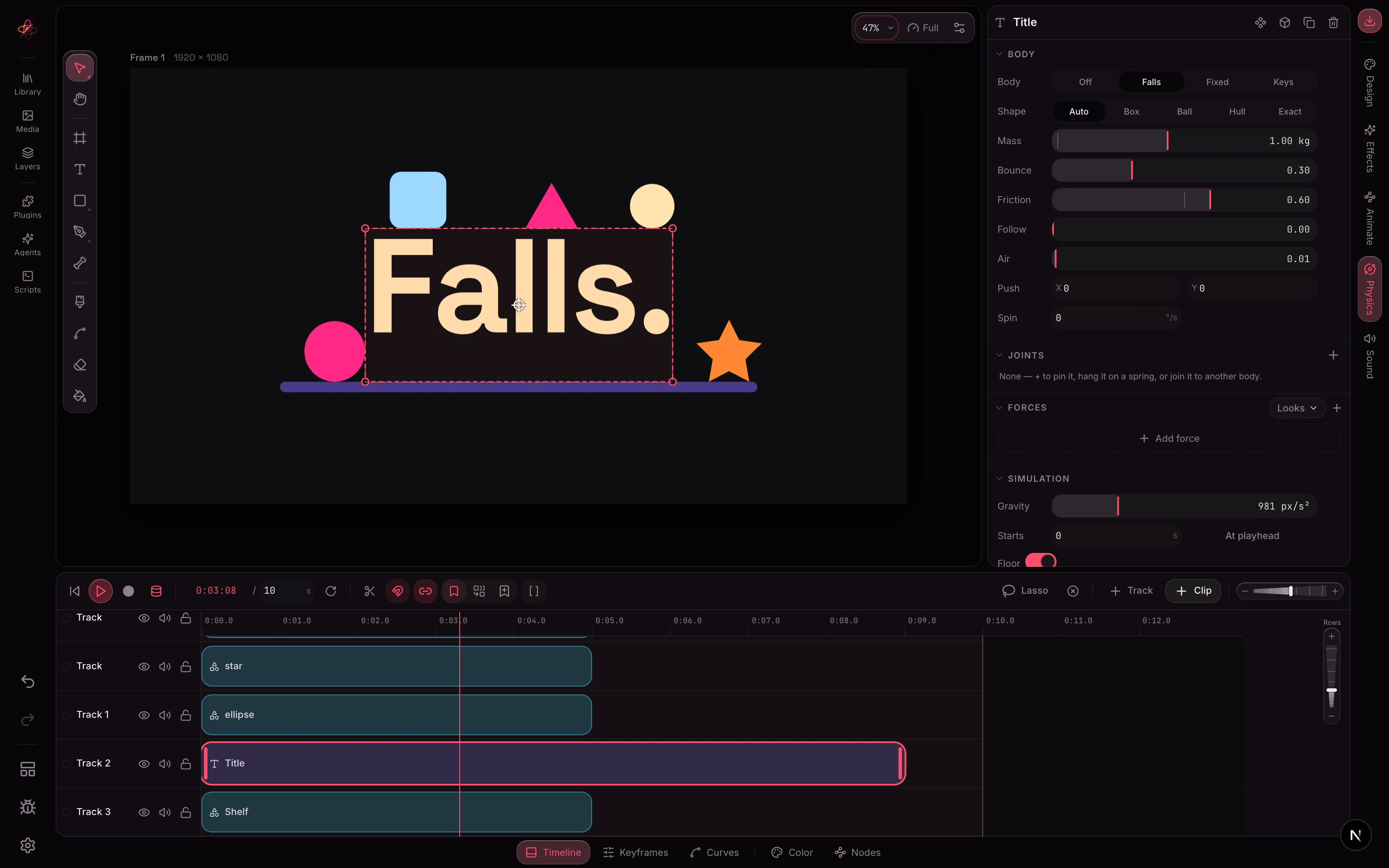
AtomCut is a free motion design and video editor that runs in the browser, with real vector tools and a keyframeable timeline, unlike a template picker. If you have made a dozen things in Canva or CapCut and just hit a wall the template list cannot fix, this is the moment this article is for.
The wall, specifically
Canva and CapCut are built around a finite set of moves: pick a template, swap the text and colors, apply a preset animation, export. That covers an enormous amount of real work, and neither tool should apologize for it. The wall shows up in three specific ways: you need a shape to move along a curve you draw yourself, not a preset "fade and slide"; you need a vector you can reshape with a pen tool, not a sticker from a library; or you hit export and find a watermark, a resolution cap, or a subscription wall between you and the file.
The table
| Tool | Price | Real vectors | Real keyframes | Watermark-free export | Timeline depth | Learning curve |
|---|---|---|---|---|---|---|
| Canva (video) | Free–$25/user/mo | No (stickers) | No | Free tier: yes, if you avoid Pro elements | Template-based | Very low |
| CapCut | Free–$19.99/mo | No | No | Free tier: yes, if you avoid Pro assets/outro | Template-based | Very low |
| AtomCut | Free to 720p; Pro for HD/4K | Yes, full Bézier | Yes, any property | Free up to 720p | Full NLE | Low–moderate |
| Rive | Free–$32/mo/seat | Yes | Position/shape only | Paid tiers only | Thin, state-machine | Moderate |
| Jitter | Free–paid/seat | Yes | Position/opacity/shape | Paid tiers mostly | Thin | Low–moderate |
| Lottielab | Free–~$18/mo | Yes | Position/opacity/shape | Paid for HD/4K | Thin | Low–moderate |
| Motionity | Free (open source) | Basic | Position/opacity/scale | Yes, always free | Moderate | Moderate |
Canva and CapCut prices dated September 2026: canva.com/pricing (Pro $18/mo, Business $25/user/mo), capcut.com (Pro $19.99/mo or $179.99/yr). Both companies change export terms by tier and region; check the current page before assuming a specific limit. Rive, Jitter and Lottielab price per seat and shift their tier names often enough that a number printed here would be stale within a quarter; see rive.app/pricing, jitter.video/pricing and lottielab.com/pricing for the current numbers.
The tools that have actual keyframes and vectors
AtomCut puts a Bézier pen and a full multi-track timeline in the same window. A shape you draw is a vector layer you can keyframe on any property, including turning an effect on or off partway through. Free covers everything up to 720p export with no watermark; AtomCut Pro removes the resolution cap and adds transparent and per-layer export.
Rive is built for animation that keeps running after export: a state machine that a live app drives with variables. It is the right choice if the output is interactive, not a rendered video or GIF. It has no video track.
Jitter is closest to Canva in spirit but with a real keyframe under the hood: position, opacity and scale on a curve you can shape, exported as MP4 or GIF. Its timeline stays thin by design; it is built for a single scene, not a multi-clip edit.
Lottielab is the direct path if the deliverable is specifically a Lottie file for an app or website, often starting from a Figma import. It is not trying to replace a video editor.
Motionity is free and open source end to end, with layers, masks and filters and no account or watermark at any tier, because there is no paid tier. It has no vector pen tool and no audio-mixed video export, which is the trade for being free without limits.
What you give up going this way
None of the five tools above have Canva's or CapCut's template libraries, stock footage, brand kits or auto-captioning. Starting a project means an empty canvas, not a layout picker, and that is a real cost measured in minutes on day one. What you get back is a file that is actually yours to reshape: a keyframe you can retime, a vector you can reopen and edit the anchor points of, an export that does not change shape because a plan changed. For a one-off social post, that trade is not worth making. For anything you will touch again next month, it usually is.
Choose Canva or CapCut if
- The job is a templated post, story or reel and speed matters more than a custom look.
- You need stock assets, brand kits or auto-captions built in.
- You are editing on a phone and want the fastest possible round trip.
Choose a real motion tool if
- You need a keyframe you shape yourself, not a preset animation.
- The deliverable is a vector file, a Lottie, or an SVG you can reuse.
- You want the export clean at every tier without hitting a wall.
Questions people ask
What's the actual difference between a template and a keyframe? A template swaps content into a fixed animation someone else authored. A keyframe is a value at a point in time that you set yourself; the software interpolates between the ones you place, so the motion is yours, not a preset's.
Can I still start from something, or is it a blank canvas? AtomCut starts blank; there is no template library yet. Canva and CapCut remain the faster choice for starting from a preset layout.
Does switching mean giving up captions and auto-generated text? AtomCut has timed captions you place and style yourself, including per-glyph effects, but nothing that transcribes speech automatically the way CapCut's caption tool does. If auto-captioning from audio is the feature you rely on most, that is a real reason to stay on CapCut for that step and bring the file elsewhere for the rest.
Is there a free option with no watermark? AtomCut's free tier has no watermark at any export resolution up to 720p. Motionity is free with no watermark at any resolution, with a smaller feature set. Canva and CapCut are also watermark-free on their free tiers as long as you stay off Pro-only elements, templates and outro clips; mixing in a paid asset is what triggers the watermark on either.